

Yes — if you want to occupy or change the use of a NSW residential building, you need an Occupation Certificate before anyone moves in. That applies to new homes, major renovations, and conversions where the building's use changes. Your next move: gather your required documents and lodge the OC application through the NSW Planning Portal, or contact your Principal Certifying Authority (PCA) to confirm exactly what preconditions remain open on your consent.
Table of Contents
- What an occupation certificate actually means for NSW homeowners
- Who issues an OC and what the Principal Certifying Authority does
- Who can apply for an OC in NSW
- Types of OCs: final, partial, and staged
- When to apply and how long the process takes
- What documents and preconditions you need before lodging
- How to apply for an OC through the NSW Planning Portal
- How much an OC typically costs
- Common reasons OCs are delayed or refused
- How Navilot helps homeowners get OC-ready
- Key Takeaways
- What most homeowners get wrong about the OC process
- Get your OC documents organized before you lodge
- Official sources for your OC application
What an occupation certificate actually means for NSW homeowners
An Occupation Certificate is the legal authorization that allows a building to be occupied or its use changed. It confirms the completed work matches the development consent, meets the conditions attached to it, and complies with the Building Code of Australia. Without one, you cannot legally move in.
The practical stakes go beyond just moving day. Insurers routinely ask for an OC as evidence the building meets safety standards. Conveyancers flag missing OCs during property sales, and buyers' solicitors can use the absence of one to renegotiate or walk away. An OC is also required for conversions such as a shed to a home office or any major alteration where the building's classification under the BCA changes — not just brand-new builds.
Key legal triggers under Section 6.9 of the Environmental Planning and Assessment Act 1979:
- Occupying a whole new building
- Occupying a new part of an existing building (where the rest already has an OC)
- Staged occupation of a partially completed building
- Changing the use of a whole or part of an existing building reclassified under the BCA
Selling or occupying without an OC creates real conveyancing and insurance problems and may breach your development consent conditions directly.
Who issues an OC and what the Principal Certifying Authority does
Two types of bodies can issue an OC in NSW: your local council or an accredited private certifier acting as the Principal Certifying Authority. The PCA is the person or organization appointed to oversee certification for your project from construction certificate through to final sign-off.
The PCA's responsibilities include:
- Conducting mandatory inspections at specified stages of the build
- Verifying that completed work matches the development consent and BCA requirements
- Completing the final inspection after the OC application is submitted through the portal
- Confirming all preconditions in the consent have been satisfied before issuing the certificate
One thing worth understanding: the PCA is not your builder or your designer. They are an independent check. The final inspection occurs after you lodge the OC application — not before — so uploading all documents first is critical.
Pro Tip: Confirm who will act as your PCA at the very start of the project, not at the end. Document every inspection they conduct and keep copies of their sign-off paperwork. Gaps in that record are one of the most common reasons OC lodgements stall.

Who can apply for an OC in NSW
The applicant must be the beneficiary of the development consent or a person who has the beneficiary's explicit written approval to apply. Common scenarios:
- Owner-builder: You hold the consent, so you apply directly.
- Developer or builder: Applies on behalf of the consent holder, usually with written authorization.
- Purchaser (off-the-plan or mid-build): Can apply only if the original consent beneficiary has formally authorized them in writing.
- Principal certifier acting on behalf of the applicant: Possible in some arrangements, but the applicant's details must still appear on the portal application.
Check your consent paperwork before starting a Planning Portal OC case. If you are not the named beneficiary, get written authorization first. Missing this step means the portal will reject the application at the identity-verification stage.
Types of OCs: final, partial, and staged
The 2017 NSW planning reforms removed the old "interim" and "final" OC labels for consents issued after 1 December 2019. Under the current framework, there are three certificate types:
| OC Type | What it covers | When you use it |
|---|---|---|
| Whole building OC | Entire development, all conditions met | Standard completion of a new home or full renovation |
| Partial OC (part of new building) | A completed portion of a partially finished build | Staged projects — e.g., main dwelling done, landscaping incomplete |
| Part OC (part of existing building) | A reclassified portion of an existing building | Change-of-use conversions in existing structures |
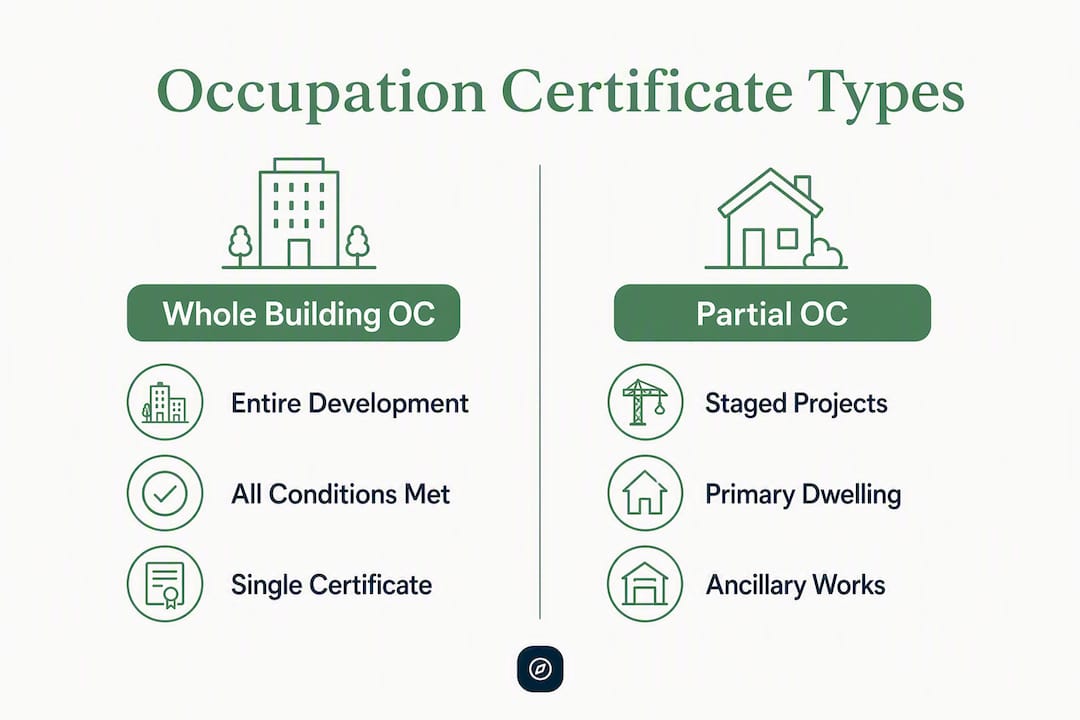
A partial OC is an underused option for staged projects. If your primary dwelling complies with the BCA but ancillary works are still in progress, a partial OC lets you move in while finishing the lower-risk items. The catch: a condition is attached requiring a whole-building OC within five years of the partial certificate being issued.
For Class 2 (multi-residential apartment) buildings, additional compliance gates apply, including an Expected Completion Notice and a building compliance declaration. These are enforced by the portal and cannot be skipped.
When to apply and how long the process takes
Lodge your OC application either as a related application linked to your existing DA or CDC case in the NSW Planning Portal, or as a standalone application if your consent sits outside the portal.
Timing markers to know:
- Class 2 buildings: Lodge the Expected Completion Notice (ECN) well in advance before applying for the OC. The portal will block your application if this step is missing.
- All builds: The final inspection by the PCA happens after you submit the OC application, not before. Upload everything first.
- Processing time: Varies by project complexity, document completeness, and certifier or council workload. Simple residential builds with complete documentation tend to move faster; projects with outstanding specialist certificates or incomplete preconditions can stall for weeks.
The single biggest time-saver is submitting a complete, well-organized application the first time. Incomplete lodgements go back to the applicant for resubmission, resetting the clock.
What documents and preconditions you need before lodging
OC applications must be submitted through the NSW Planning Portal with a specific set of documents. Missing even one can trigger a rejection.
Core documents:
- Development consent or Complying Development Certificate (CDC)
- Construction certificate (where applicable)
- Final certified architectural and engineering drawings
- Fire safety certificate (if a fire safety schedule is required)
- Building compliance declaration (mandatory for Class 2 buildings)
- Statutory declarations where required by the consent
Common additional preconditions:
- Landscaping completion evidence (where required by consent)
- Sydney Water or Hunter Water compliance certificate
- BASIX certificate compliance evidence
- Consultant declarations (structural engineer, fire safety practitioner)
- Insurance certificates or progress invoices where requested
File and format tips:
| Requirement | Practical tip |
|---|---|
| File types | PDF preferred; check portal file-size limits before uploading |
| Naming | Use descriptive names: "FireSafetyCert_[address]_[date].pdf" |
| Bundling | Group consultant declarations into a single PDF where possible |
| Pre-upload | Upload documents into the portal before starting the OC case |
Pro Tip: Ask each consultant — structural engineer, fire safety practitioner, water authority — for a signed, dated compliance certificate timed to be valid at the date of your OC lodgement. Record each issuing date in your submission checklist. A certificate that expires before lodgement day is treated as missing.
The construction certificate is a prerequisite for most residential OC applications, so confirm it is current and attached before you start.
How to apply for an OC through the NSW Planning Portal
From 1 July 2021, all NSW councils must use the NSW Planning Portal to process OC applications. There is no paper-based alternative.
- Create or log into your NSW Planning Portal account. If you do not have one, register at the portal before anything else.
- Start or link your OC case. For a DA- or CDC-linked application, locate the existing application and select "Request related application," then "Request Certificate." For a standalone application, select "Post Consent Certificate (CC, OC, SC, PCA, SWC)" from the New menu.
- Select "Occupation Certificate" from the certificate type list, then choose the class of development.
- Complete Class 2 compliance gates if applicable: confirm the ECN has been lodged, the audit is complete, and any required building bond is in place.
- Select full or partial development and enter the related approval details (DA number, CDC reference).
- Enter owner and applicant details, including company name and ABN if a business owns the site.
- Search for and confirm your Principal Certifier by company name, trading name, ABN, or ACN.
- Attach all required documents, categorizing each file type before clicking Attach.
- Complete the applicant declaration and review all information.
- Click Submit and pay the portal processing fee.
After lodgement, your PCA will schedule the final inspection. If the work meets all requirements, the certificate is issued. For complying development projects, the same portal workflow applies.
How much an OC typically costs
The OC issue fee is often included in the principal certifier's contract fees, but that does not mean the process is free. Expect separate line items.
Common cost items:
- Portal digital application processing fee: Payable at lodgement through the NSW Planning Portal, separate from certifier fees.
- Additional certifier inspection fees: If extra inspections are needed beyond those in the original contract.
- Specialist compliance certificates: Structural engineer, fire safety practitioner, and water authority certificates each carry their own fees.
- Water authority processing fees: Sydney Water or Hunter Water compliance certificates have their own application costs.
- Developer levies and building bonds: For Class 2 or strata schemes, additional statutory fees apply.
Questions to ask your certifier or builder before you start:
- Is the OC issue fee included in the building contract or certifier agreement?
- What does the certifier charge for additional inspections?
- What portal fees should I budget for?
If you are working under a fixed-price or cost-plus building contract, check whether compliance certificate costs are the builder's responsibility or yours. The contract language on this point matters more than most owners realize.
Common reasons OCs are delayed or refused
Many OC rejections happen because applicants underestimated the preconditions buried in their original development consent. The portal enforces compliance gates automatically, so a missing declaration stops the application cold.
Frequent causes:
- Incomplete preconditions from the development consent (landscaping, bonds, notices)
- Missing or expired compliance declarations
- Outstanding specialist certificates (engineer, fire safety, water authority)
- Incomplete external works that the consent required before occupation
- Class 2 buildings missing the ECN or building compliance declaration
Prevention steps:
- Pull the full list of consent conditions on day one of construction and track each one
- Keep consultant certificates current and confirm expiry dates before lodgement
- Pre-upload all documents into the portal before starting the OC case
- Confirm the PCA's inspection schedule and book the final inspection only after all documents are uploaded
Pro Tip: Treat the OC as the final deliverable of your project, not an afterthought. A single tracked checklist that maps every consent condition to a piece of evidence is the difference between a smooth sign-off and a three-week delay waiting for a reissued engineer's certificate.
How Navilot helps homeowners get OC-ready
Navilot is a preparation and document-organization platform built for homeowners navigating exactly this kind of process. It does not issue OCs or act as a certifier. What it does is build you a tailored checklist based on your specific project and property, map each consent condition to the evidence item that satisfies it, and organize your documents into a portal-ready bundle before you lodge.
A typical Navilot-generated checklist for an OC application includes:
- Copy of the development consent or CDC
- Construction certificate (confirmed current)
- Final certified architectural and engineering drawings
- Fire safety certificate (if required by the consent)
- Sydney Water or Hunter Water compliance certificate
- BASIX compliance evidence
- Structural engineer's declaration (signed and dated for lodgement day)
- Fire safety practitioner's declaration
- Landscaping completion evidence
- Insurance certificate or progress invoice (where requested)
Pro Tip: Use Navilot's document workspace to pre-upload files before you open the OC case in the portal. The portal's final inspection is triggered by lodgement — so having everything ready before you click Submit means your certifier can act immediately rather than waiting on paperwork.
Navilot is particularly useful for owner-builders and homeowners managing their own approval process, where the risk of missing a consent condition is highest.
Key Takeaways
An Occupation Certificate is legally required before occupying or changing the use of any NSW residential building, and the application must be lodged through the NSW Planning Portal with all preconditions and compliance documents in place.
| Point | Details |
|---|---|
| OC is mandatory | You cannot legally occupy a new or converted NSW building without a current OC. |
| Portal is the only channel | Since July 2021, all NSW councils process OC applications through the NSW Planning Portal. |
| Documents first, inspection second | The PCA's final inspection happens after lodgement — upload everything before you submit. |
| Class 2 buildings have extra gates | An Expected Completion Notice must be lodged 6–12 months before applying for a Class 2 OC. |
| Navilot organizes your submission | Navilot builds a tailored checklist and document workspace so your application is portal-ready before you start. |
What most homeowners get wrong about the OC process
The OC bottleneck almost never comes from the portal itself. It comes from a single missing certificate — usually a structural engineer's declaration or a water authority compliance letter — that nobody tracked during the build. The certifier arrives for the final inspection, the document is not uploaded, and the whole process pauses while the applicant chases a consultant who has moved on to the next job.
The fix is not complicated, but it requires treating the OC as a live project milestone rather than a box to tick at the end. Every specialist you engage during the build should know upfront that you will need a signed, dated compliance certificate from them before lodgement. Put it in writing. Set a reminder two weeks before your expected lodgement date to confirm each certificate is in hand and still valid.
One more thing: schedule your final certifier inspection only after every document is uploaded to the portal. The inspection is triggered by lodgement, not the other way around. Submitting an incomplete application to "get the inspection booked" is one of the most common and avoidable mistakes in the process.
Get your OC documents organized before you lodge
Gathering compliance certificates, tracking consent conditions, and formatting a portal-ready submission is the part of the OC process that catches most homeowners off guard. Navilot cuts through that by generating a personalized preparation roadmap for your specific project — mapping every consent condition to the document that satisfies it, organizing your files into a submission-ready workspace, and flagging gaps before they become rejections.
Navilot does not issue OCs or act as a certifier. It prepares you so that when you open the NSW Planning Portal, everything is already in order. Check whether your project and council are covered, then start your free project roadmap to see exactly what your OC application needs.
Navilot provides preparation and document organization support only. It does not issue Occupation Certificates, act as a Principal Certifying Authority, or provide legal or planning advice. Confirm your specific requirements with your certifier or a qualified professional.
Official sources for your OC application
These are the primary references for forms, step-by-step guides, and compliance declarations:
- NSW Planning Portal — Occupation Certificate page: Start here for the portal workflow, lodgement instructions, and document requirements. Mandatory channel for all NSW councils since July 2021.
- Service NSW — Apply for an Occupation Certificate: Plain-English overview of the OC requirement and what to expect; useful for first-time applicants confirming whether they need a certificate.
- Post-build — MyHome Planner (Planning Portal): Covers the post-consent process including final inspection timing, certifier fees, and resale implications. Consult this for cost questions and post-OC obligations.
- Your Guide to the Post Consent Process (NSW Planning PDF): Detailed PDF covering ECN requirements for Class 2 buildings, compliance declarations, and portal compliance gates. Essential for developers and multi-residential projects.
- Occupation Certificates FAQ (NSW Planning PDF): Covers partial OCs, staged occupation, transitional arrangements for pre-2019 consents, and when an OC is not required. Useful for edge cases and conversions.
- I Have a DA, CC or CDC Approval (Planning Portal): Explains compliance declaration requirements and portal validation steps for applicants with existing approvals. Consult this for compliance gate troubleshooting.
For conveyancing implications of an OC at sale, an online property conveyancing questionnaire can help you understand what a buyer's solicitor will ask for and how to prepare.